Welcome! To installing dependencies.
Update: You can skip this step!
Feel free to download and compile Fluency yourself if you like, but if you lack the means or you want to try before you buy, you can try Fluency Online here: https://kansattica.github.io/FluencyOnline/ It's the exact same program as here, just compiled to run in your browser. It's still in beta, and you might run into weird bugs, but it's there!
Or you can download a precompiled release at https://github.com/Kansattica/Fluency/releases! This is the recommended option- no compiling needed. Once you've downloaded Fluency, you're ready to go! I suggest renaming the file to fluency or fluency.exe so it's easier to type.
If you really want to compile the code yourself, here you go. You'll need:
- Either download and extract the zipped source code from Github here or use
gitto download the source code. I'll have ready-made binary releases someday, but not while it's still in active development. If you're comfortable with the command line, you can download and install git here, and find links to easier-to-use graphical clients. There's gonna be some command line work no matter what, so keep that in mind. - Some kind of text editor. I usually use Visual Studio Code for this, but you can write your code in Notepad if you like. VS Code gives you some nice syntax highlighting, so that's what I use.
- The
dotnet core 3.1 SDK- https://dotnet.microsoft.com/download. Look at the the column on the left. You do not want the full, non-core .NET framework for this. Make sure you get the SDK, because you will be compiling code. - A song in your heart. I can't tell you where to get this, it has to come from within.
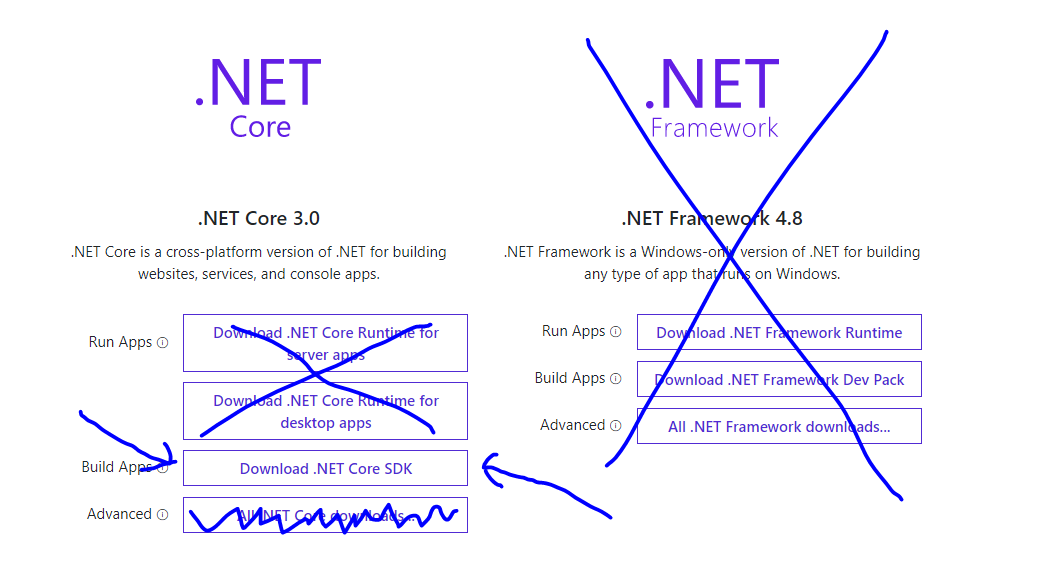
Once you have this all set up, head on over to the Fluency repo and clone the source code. You'll probably end up copying and pasting a link that looks like this: https://github.com/Kansattica/Fluency.git into something on your git client that says "clone" or "clone new" or some such. On the command line, it's:
git clone https://github.com/Kansattica/Fluency.git
Speaking of the command line, you'll need one. On Windows, I like to use Powershell. I've never done dotnet core development on Linux, but I'm led to believe it works fine. I won't recommend tools to use because you probably already have your favorites.
Anyways! Once you have Fluency cloned, cd into the directory and make sure everything looks alright. At the time of this writing, the root directory looked like this in powershell to me.
C:\Users\Grace\Documents\Sauce\Fluency [master ↑2 +3 ~2 -0 !]> ls


    Directory: C:\Users\Grace\Documents\Sauce\Fluency


Mode                LastWriteTime         Length Name
----                -------------         ------ ----
d-----         8/7/2019   6:10 PM                .vscode
d-----         8/7/2019   6:04 PM                Console
d-----         8/7/2019   6:04 PM                Documentation
d-----         8/8/2019   5:02 PM                Examples
d-----        7/31/2019   4:24 PM                Execution
d-----        7/31/2019   4:24 PM                Tests
-a----        7/31/2019   4:24 PM             17 .gitignore
-a----         8/8/2019   5:02 PM            865 .travis.yml
-a----        7/31/2019   4:24 PM           6598 Fluency.sln
-a----         8/8/2019   5:14 PM           4080 README.md
-a----         8/8/2019   5:02 PM            382 todo.md
Yours will, of course, probably have your own directory and not have my git history. That's fine. cd Console to enter the console project. This is where you'll be running your Fluency code from. If you're using Visual Studio Code, you can bring up a nice built-in powershell window to use while you edit your code up top. Do a dotnet build to make sure everything works, and a dotnet test .. (note the double dots afterwards- you want to tell it to run from the top directory) if you want to be really sure.
Now, let's move on to your first Fluency program!